KWET

For Last War: Survival alliances

Lead your alliance, not a spreadsheet

KWET replaces the spreadsheet your R4s fill in and the screenshots they pass around. VS, kills, donations, squads, trains and records update on their own, on your alliance's own site, readable by every member on their phone.

Before you sign up: KWET needs one R4 who plays on PC, running a third-party program while they play. How the data arrives

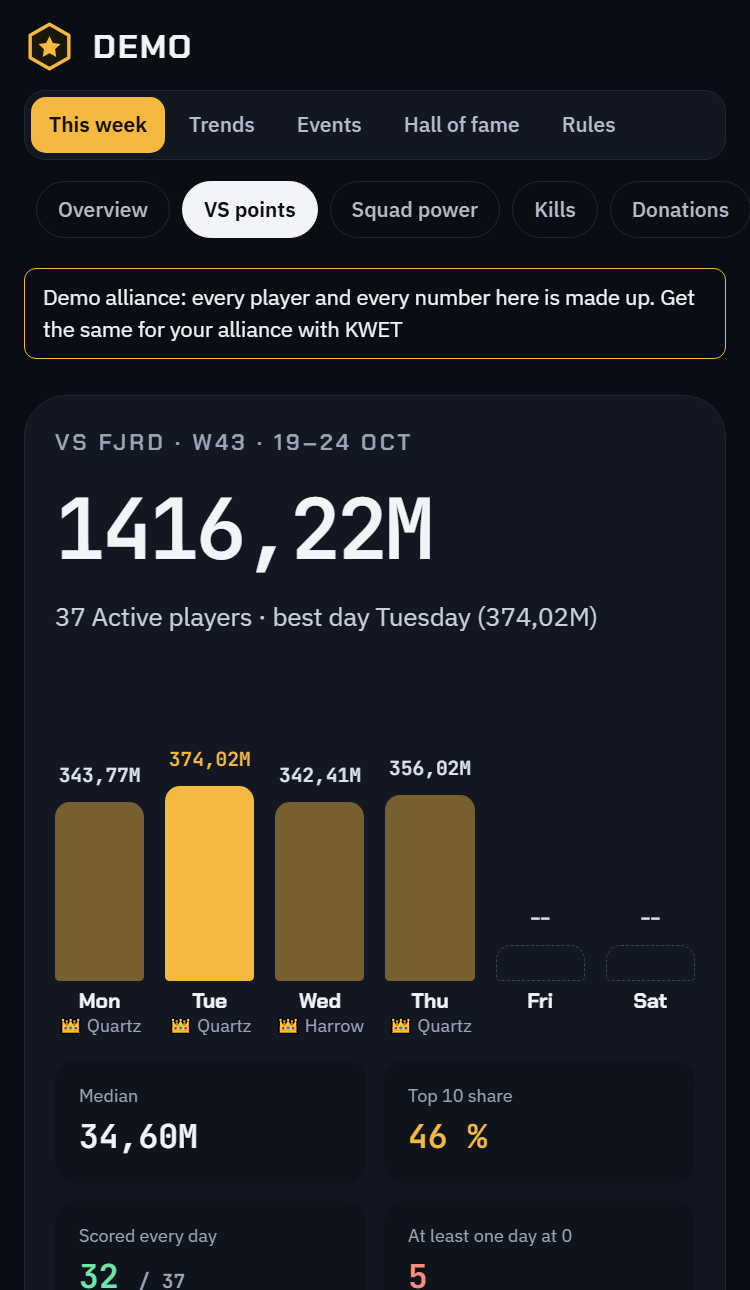
VS ranking of the week in the demo alliance, on a phone
Demo alliance — made-up players

What it takes off your plate

Every R5 knows these questions. Each one has its page.

Members · VS

Who made the VS minimum this week?

The weekly VS ranking against your alliance's own minimum, day by day. During the week each player is judged against the pace — a sixth of the minimum per day played — not against a total nobody can reach yet. Push weeks and save weeks are never compared.

See it in the demo →
Members · Kills

Who actually fights?

Kills per week, worked out from the game's lifetime counter, with tiers and current form. A week nobody captured stays “not measured” instead of showing a fake zero.

See it in the demo →

Members · Donations

Who donates, and who stopped?

Donation points week by week. Zero means “did not donate”; a missing value means “not measured” — the page never mixes the two.

See it in the demo →

Members · Squads

How strong is the roster, really?

Squad power and total hero power (THP) for every member, with gains over 30 days, so you see who is growing and who is standing still.

See it in the demo →

Members · Ranking

Who belongs on the hot seat?

A composite score from VS, kills, squads, donations and events, with weights your R4s set. The bottom of the list is the hot seat: the conversation starts from numbers, not from impressions.

See it in the demo →

Trains

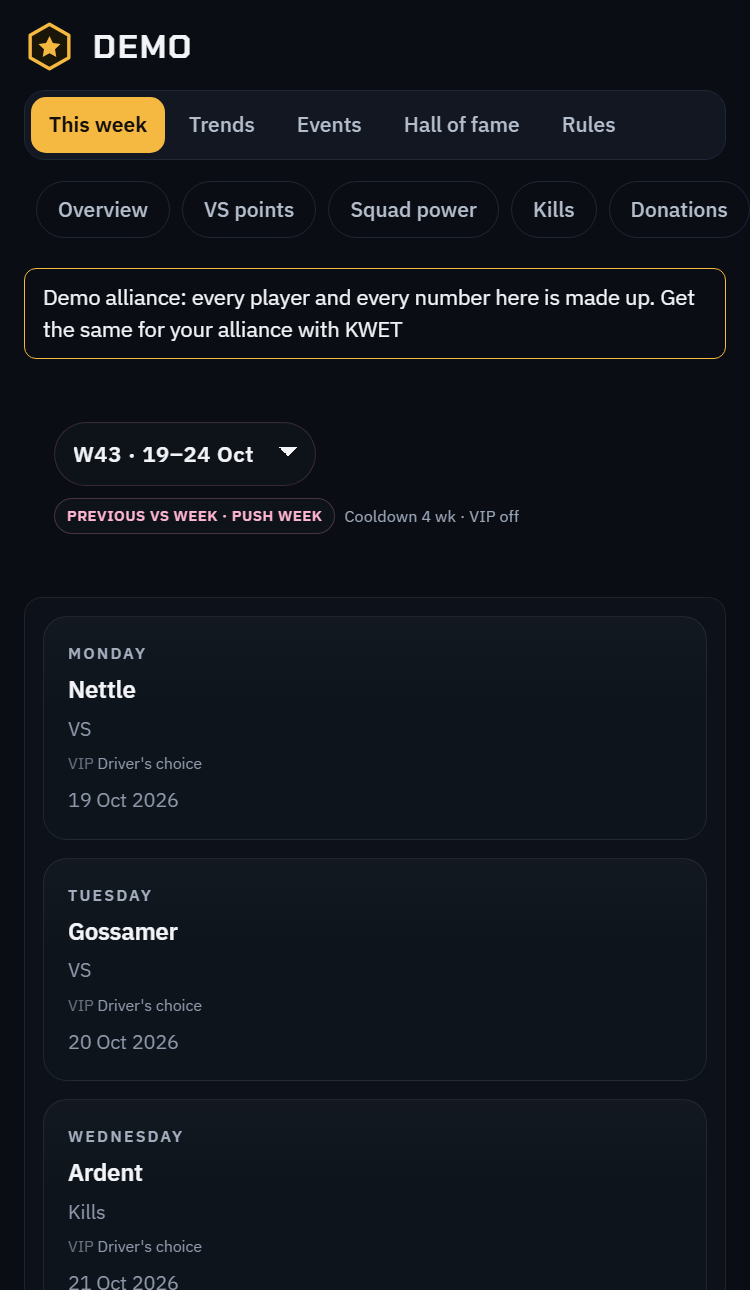
Whose turn is the train today?

Rules per weekday — top VS, top kills, a lottery among those who had the fewest trains, an R4/R5 rotation — with cooldowns and VIP seats. The week's schedule is drawn for you, and compared with the trains that actually left.

See it in the demo →
Train schedule of the week in the demo alliance, on a phone
Demo alliance — made-up players

Records

Something to brag about

A wall of records, streaks and progress: best VS week, longest run above the minimum, biggest climb. Members come back to the site for this page.

See it in the demo →

Chapters

We moved server. Now what?

When the alliance changes server, the R5 opens a new chapter. Alliance pages start fresh on the new server, the previous chapter stays readable, and every player's history follows them.

R4/R5 access

Who can change things?

R4s and R5s sign in with their own Discord account. Access follows the rank in the game: an R4 demoted in game loses access to the site, without anyone touching a list.

How the data arrives

Nobody types numbers in. Here is the whole chain, plainly.

  1. An R4 who plays on PC runs a third-party program while they play. The program is independent from KWET and from the game.

  2. The program reads the rankings the game shows — VS, kills, donations, power, ranks, train mails. It changes nothing in the game.

  3. It sends those rankings to your alliance's site, which sorts them by player and by week. No manual entry, no screenshots.

What this means for you: at least one R4 on PC. Without them, the site has nothing to show. With two, nobody is irreplaceable.

Price

Free during the pilot

KWET is free while it is being piloted with a few alliances. It is funded by donations.

Make a donation

Questions

Who can see our data?

Your alliance site is public to read: anyone who has the address sees the rankings and the in-game names. Only your R4s and R5s, signed in with Discord, can change anything.

What if our PC R4 leaves?

Data stops arriving, nothing is lost. Another R4 on PC installs the program with your site address and the token. To cut off the old token, generate a new one in R4 Tools → Ingest.

We are changing server.

Declare a new chapter in R4 Tools → Chapters, from the Monday you arrive. Alliance pages restart on the new chapter, the old one stays readable, and each player keeps their own history.

How do we delete our alliance?

Write to LittleSanto on Discord. Each alliance lives in its own database: it is deleted as a whole, and the backups that still hold it expire within 7 days.

Which languages?

English, French, German and Ukrainian, on the product site and on every alliance site. Switch at the top of any page.

Ready?

Fifteen minutes for the R5, one R4 on PC, and the first rankings arrive the same day.